





Credentials are the leading cause of enterprise breaches
22%
of breaches start with stolen credentials
€4 million
average cost per breach

Deploy on your own servers. Your credentials stay inside your infrastructure, protected by zero-knowledge encryption. Built in the EU, designed for GDPR compliance. Full access control, audit logs, and role management across every department.
Trusted by top teams:






Developed in Europe, with full GDPR and NIS2 compliance and data sovereignty
Development and infrastructure meet the international benchmark for information security
Chosen by government agencies and highly regulated industries across Europe
Zero-knowledge architecture with client-side encryption keeps your passwords private
Independent research shows 30% savings compared to competitors
of breaches start with stolen credentials
average cost per breach
Without enforcement, employees reuse the same passwords across personal and work accounts.
of employees reuse passwords across accounts
GDPR and NIS2 audits require full credential access history. Scattered storage leaves nothing to show regulators.
NIS2 fine for organizations that can’t demonstrate access control compliance
Personal password managers lack AD sync, SSO, role-based access, and centralized IT control.
API keys and tokens hard-coded in repositories become liabilities during security reviews.
GDPR, HIPAA, and PCI DSS all require encrypted storage and audit trails for credentials.
Stolen credentials are consistently the leading attack vector in enterprise breaches.

Browser autofill and shared vaults cut the password chaos behind most helpdesk tickets. AD/LDAP sync handles new user provisioning automatically.

Every access event is recorded. Export reports that satisfy GDPR, HIPAA, and PCI DSS requirements on demand. Built and operated in the EU.

On-premise deployment keeps every credential on your infrastructure. Built in the EU, hosted on your servers. Passwork never sees your data in plaintext.
Get secrets for deployment without storing them in CI/CD system environment variables. The CLI passwork automatically substitutes the actual secrets at runtime.
All DevOps features →Get secrets programmatically in your Python apps. Library handles auth, encryption and token caching.
All DevOps features →Use Passwork CLI image to deliver secrets into containers. Secrets are never stored in images or logs.
All DevOps features →Create Kubernetes secrets from Passwork automatically and integrate with GitOps workflows.
All DevOps features → pipelines: default: - step: name: Deploy with Passwork credentials image: passwork/passwork-cli:latest script: - passwork-cli exec --password-id 'deploy_credentials' -- ./deploy.sh environment: - PASSWORK_HOST=https://your-passwork.domain - PASSWORK_TOKEN=$PASSWORK_TOKEN - PASSWORK_MASTER_KEY=$PASSWORK_MASTER_KEY from passwork_client import PassworkClient # Client initialization passwork = PassworkClient("https://your-passwork.domain") passwork.set_tokens("your_access_token", "your_refresh_token") passwork.set_master_key("your_master_key") # Getting secrets database_item = passwork.get_item(item_id=PASSWORD_ID) database_password = database_item['password'] # Using in application db_connection = connect_to_database( host="prod-db.company.com", password=database_password ) # Running container with access to secrets docker run --rm \ -e PASSWORK_HOST=https://your-passwork.domain \ -e PASSWORK_TOKEN=your_access_token \ -e PASSWORK_MASTER_KEY=your_master_key \ passwork/passwork-cli:latest \ exec --folder-id FOLDER_ID --tags "production" -- python app.py # Or in docker-compose services: app: image: passwork/passwork-cli:latest command: exec --folder-id ${FOLDER_ID} --tags "production" -- ./start-app.sh environment: - PASSWORK_HOST=https://your-passwork.domain - PASSWORK_TOKEN=${PASSWORK_TOKEN} - PASSWORK_MASTER_KEY=${PASSWORK_MASTER_KEY} # Via YAML manifest passwork-cli exec --folder-id FOLDER_ID --tags "production" -- sh -c " cat <<EOF | kubectl apply -f - apiVersion: v1 kind: Secret metadata: name: app-production-config namespace: production type: Opaque stringData: database-url: \"postgresql://\$DB_USERNAME:\$DB_PASSWORD@\$DB_HOST:5432/app\" redis-url: \"redis://:\$REDIS_PASSWORD@redis:6379\" api-key: \"\$API_KEY\" webhook-secret: \"\$WEBHOOK_SECRET\" EOF" Every encryption operation happens on your device. Passwork never sees your data in plaintext.

All encryption runs client-side. Passwork servers store only encrypted data and cannot access your credentials.

Credentials encrypted with AES-256 before leaving your browser. Industry-standard key derivation protects the master key.

TOTP authenticator apps, dedicated Passwork 2FA, and hardware security keys. Enforce MFA organization-wide.

Run Passwork on your own EU-based servers for total data sovereignty. No data ever leaves your infrastructure.

Source code available for independent review. External researchers regularly evaluate the platform.

Every action logged: who accessed which credential, when, and from where. Export for compliance audits.
 ISO 27001
  Made in EU
  Pentest by
 GDPR
GDPR HIPAA ready
  PCI DSS
 The password security dashboard flags weak, reused, and expired credentials across your organization.


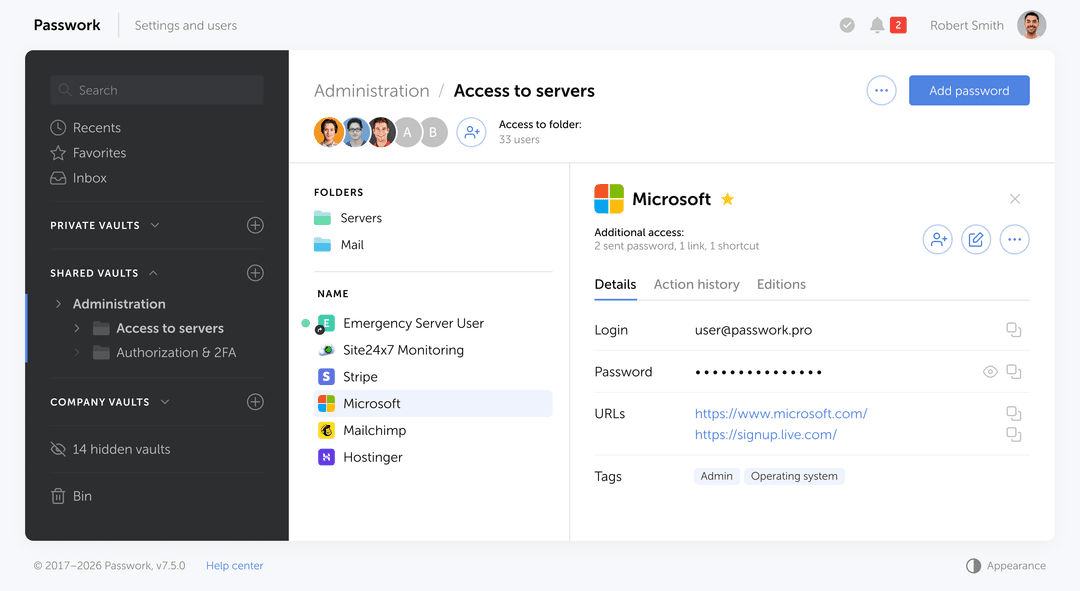
Share credentials through organized folders with granular permissions. Role-based access control ensures each team member sees only what they need.
Replace spreadsheets, sticky notes, and scattered local files with one centralized encrypted vault.

Secure access management for enterprise teams
Learn morePasswork offers intuitive security: teams scale from 100 to 600 users — no training or onboarding required. Thoughtful UX makes security seamless, so your team can focus on work, not passwords.
Passwork grew from an internal tool to a trusted solution for thousands — from 10 to 30 000+ users. Flexible, scalable, and easy to adapt to any workflow or security needs.
Passwork is ISO 27001 certified, rigorously tested by experts, and meets the highest security standards. It’s trusted by major organizations across Europe and is available as a fully isolated on‑premise solution.
Passwork delivers up to 30% cost savings compared to competitors, offering industry‑leading TCO with zero compromise on security. Multi‑year plans unlock even greater value — without vendor lock‑in.
A partnership‑first approach: no pressure, no hassle — just genuine support, and a team that treats you like a true partner, from your first demo to long‑term success.
Passwork recognized for its unified password and secrets management, business-first design, and focus on data sovereignty.
OWASP training and threat modeling in every development team
Static & dynamic analysis, SCA, IaC scanners integrated into every build
No direct pushes to main branch, mandatory security code review
Annual penetration testing and security audits by independent experts
Features | |
|---|---|
| Auditable source code |  |
| Prompt tech support | |
| Centralized user management | |
| Fine-tuning of access rights | |
| Role-based user rights management | |
| Group-based access control | |
| Auditable source code | |
| Prompt tech support | |
| Centralized user management | |
| Fine-tuning of access rights | |
| Role-based user rights management | |
| Group-based access control | |
| Event logging and user activity tracking | |
| SIEM integration via syslog | |
| Password audit after staff changes | |
| Password complexity analysis | |
| Secrets Manager is included by default | |
| API for integration with third-party systems | |
| Cross-platform apps (Browser extensions, Desktop apps, Mobile apps) | |
| Failsafe solution with data replication | |
 |  |  |
|---|---|---|
| | | |
| |  | |
| | | |
| | | |
| | | |
| | | |
| | | |
| | | |
| | | |
| | | |
| | | |
| | | |
| | | |
| | | |
| | | |
| | | |
| | | |
| | | |
| | | |
| | | |
Best software to password management on premise. We chose it after checking various solutions. The possibility of installing it on our systems weighed heavily on the choice. The use is simple and …
I was looking for an on premise solution to store and manage our passwords. Multiuser with different roles and rights was a must, LDAP integration a nice add on. Passwork ticked all the boxes. They were …
Very easy and secure Passwork Manager. Easy sharing functionalities. Good LDAP integration, TOTP and Multifactor Authentication Options.
Every team manages credentials differently. See how companies across industries use Passwork to secure access, streamline collaboration, and maintain full control. From small IT teams to enterprise-wide deployments.

The City of Melle deployed Passwork to centralize credential management across municipal departments, eliminating password-related security incidents and improving access control.

Kindernothilfe deployed Passwork to enable secure password sharing across distributed teams in multiple countries, reducing access-related delays and improving operational efficiency.
Grow recurring MSP revenue with EU-native password manager
Search, autofill, and create credentials without leaving the browser. Works with Chrome, Firefox, Edge, and Safari.


Quick access to your corporate passwords from your mobile device


Convenient login verification using the Passwork authenticator app
Full password management functionality in a native desktop application


See the differences between plans and choose the right level of security and control for your team.
See the differences between plans and choose the right level of security and control for your team.
Essential features for small and medium businesses to support secure growth
Advanced capabilities for large-scale security and management needs
Tailored to your infrastructure, security standards, and unique business needs
Join thousands of IT professionals who trust Passwork to manage their passwords securely. Start your free trial today or schedule a personalized demo.
Grow recurring MSP revenue with EU-native password manager
Search, autofill, and create credentials without leaving the browser. Works with Chrome, Firefox, Edge, and Safari.
Quick access to your corporate passwords from your mobile device
Convenient login verification using the Passwork authenticator app
Full password management functionality in a native desktop application
See the differences between plans and choose the right level of security and control for your team.
See the differences between plans and choose the right level of security and control for your team.
Essential features for small and medium businesses to support secure growth
Advanced capabilities for large-scale security and management needs
Tailored to your infrastructure, security standards, and unique business needs
Join thousands of IT professionals who trust Passwork to manage their passwords securely. Start your free trial today or schedule a personalized demo.
Passwork is designed for organizations that need strong security, flexible deployment, and clear control over credential access. European enterprises choose Passwork because it combines enterprise-grade password management with deployment options that fit different security, legal, and infrastructure requirements.
Yes. Passwork offers both self-hosted and SaaS deployment models. The product is positioned as on-premise first, SaaS by choice, which is useful for enterprises that want to choose between maximum infrastructure control and faster cloud adoption.
Yes. Passwork’s SaaS offering is hosted in Germany (EU), which makes it more relevant for European organizations that want a cloud deployment while keeping data hosted in the EU. Passwork also emphasizes GDPR compliance in its public positioning.
This split matches how Passwork presents its deployment strategy publicly.
Passwork is better positioned as a flexible alternative to cloud-only tools because enterprises can choose the deployment model that fits their risk model, procurement rules, and IT architecture.
This is especially relevant in Europe, where enterprises often evaluate security architecture, hosting location, and governance requirements more strictly.
Passwork supports integration with standard enterprise identity systems, helping organizations align password access with existing authentication and user lifecycle processes.
Passwork is built for shared business use, not personal password storage. It supports structured access management across teams, administrators, and business units.
This helps enterprises replace informal password sharing with a governed model that is easier to manage and audit.
Passwork publicly describes its architecture as built around enterprise-grade credential protection, with encryption, access control, and secure development practices.
Passwork also states ISO 27001 certification and third-party penetration testing, including HackerOne.
Passwork includes audit-related capabilities that help organizations improve traceability and internal control over credential access.
For European enterprises, this is useful not only for security operations, but also for procurement reviews, internal audits, and compliance programs.
Yes. Passwork states that it is designed for organizations from 10 to 30,000+ users, and its public materials emphasize flexible, scalable deployment for enterprise use.
Yes. Passwork explicitly positions itself for government agencies, public sector organizations, large enterprises, and highly regulated environments. Its messaging emphasizes secure development, infrastructure control, auditability, and European hosting or self-hosting options depending on the deployment model.
That makes it suitable to position for:
Passwork’s public site describes migration support through import tools and implementation support, including structured onboarding for business environments.
A safer enterprise phrasing is that Passwork is designed to support migration from existing password tools and less controlled internal storage methods with minimal disruption.
The choice depends on security model, legal requirements, and internal IT capacity.
If you haven't received the email, check your spam folder or contact us at [email protected]
Please click the button below to change the language
Switch to EnglishFill out the form below to get your copy of the report
Fill out the form below to get your copy of the NIS2 guide


 User management


 No credit card required


